On Fridays 20th and 27th March, between 6:30 and 7:30 am, access to library online resources that require authentication through libproxy will be unavailable.
This will affect resources to which you need to login to access, including ebooks, databases and exam papers.
This outage is to enable IMS to move libproxy to an new off-site server.

Tuesday, March 17, 2015


Wednesday, March 11, 2015
Laptop loans - New procedure at Mt Albert Hub
As of 11 March 2015 we are extending our laptop loan service at the Mt Albert Hub from the Hub Library (B110) to the new Hub commons area near the coffee kiosk. Please note the following important information about this service.
The Laptops loan service in the Hub will be open the following hours:
Monday - Thursday: 8.30am - 8.30pm
Friday: 8.30am - 5.30pm
Saturday: 9am - 4.00pm
Sunday: 9am - 4.00pm
Currently laptops are available from the office in the Hub area which is near the back of the area by the printers. If no one is in the office during the hours stated above please ask for assistance at the Ask Us desk in the centre of the area.
Important Notes:
We currently have 41 laptops available for loan in the Hub Commons and Hub Library.
Please use this feedback form to send us feedback about this service: https://unitec.wufoo.com/build/rate-the-hub-ask-us-and-computing-servicespace/
The Laptops loan service in the Hub will be open the following hours:
Monday - Thursday: 8.30am - 8.30pm
Friday: 8.30am - 5.30pm
Saturday: 9am - 4.00pm
Sunday: 9am - 4.00pm
Currently laptops are available from the office in the Hub area which is near the back of the area by the printers. If no one is in the office during the hours stated above please ask for assistance at the Ask Us desk in the centre of the area.
Important Notes:
- Laptops must be returned within 4 hours of time of loan or by the end time specified above - whichever is earlier.
- If laptops are returned late they will accrue a fine of 50 cents per hour.
- If a laptop is damaged or not returned, the borrower will be charged a replacement fee of $1000.
- If you have library or Unitec fines/fees owing of over $5 you cannot borrow a laptop (fines must be paid at the Library not the Hub commons area)
We currently have 41 laptops available for loan in the Hub Commons and Hub Library.
Please use this feedback form to send us feedback about this service: https://unitec.wufoo.com/build/rate-the-hub-ask-us-and-computing-servicespace/
Sunday, March 08, 2015
Link from Moodle to Library resources using Permalink
Our upgraded Library system has a new Permalink option. The permalink option makes it easy to link to library resources from Moodle or other places.
How to find the permalink to a record in LibrarySearch:
- Find the record in LibrarySearch and click ‘Details’
- Click ‘Actions’
- Select ‘permalink’ from drop down list
- Copy the link that pops up and paste it into Moodle or Word or a website you wish to link from (or paste into Notepad until ready to use in Moodle etc)
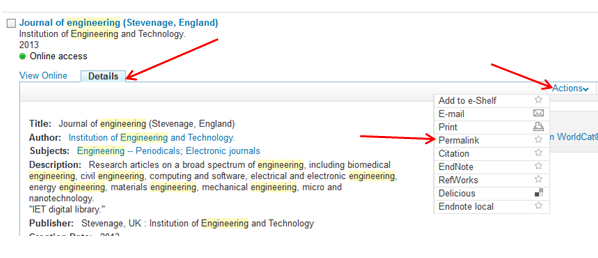 |
| Details > Actions > Permalink |

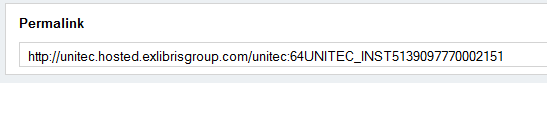 |
| Select this link > Right click 'Copy' > Paste into Moodle etc |
Friday, March 06, 2015
Start strong this semester
Learn essential computer and study skills to help you succeed at Unitec:

- Workshops for undergraduates (click here to book - for APA referencing workshops click on "rev up your writing...')
- Workshops for postgraduates (click here to book - for workshops on Endnote, Zotero and Databases click on the 'locate appropriate info and keep records...)
- Unitec Computer Orientation (drop in) runs until 13th March
- IMS (Unitec computers) Quickstart Course: You can do this online in your own time
Note: The two courses above cover Unitec systems. For free Microsoft Office training see FREE4U and FreeB courses. - Moodle help
- Printing and copying help
- For learning about referencing software and searching library databases see under 'study skills'
Monday, March 02, 2015
Course Reserve is changing (Teachers please note)
Course Reserve is the name the Library uses for course-related items that are kept at the desk for issuing on short loan. Course Reserve (Short Loan) items are a subset of Course Reading Lists.
Our recent library system upgrade enables us to display your entire Course Reading List on LibrarySearch. We can link to items online (such as ebooks) as well as items physically located in any part of the Library, not just Course Reserve items held at the desk.
To access a Course Reading List just select the ‘Course Reading’ tab in LibrarySearch and search for the course code, course name or lecturer name.
For Semester One 2015 please email your Course Reading List to the administrator (see below). Remember to include your course code and name. If you require items to go on Course Reserve please see the instructions below.
If you have already provided us with your reading list for Semester One 2015 please check your reading list on LibrarySearch now. If you need to make any changes please contact your administrator.
At the end of 2014 we removed all items from Course Reserve (see NEST notice 18/11/14). This semester we are putting items back on Course Reserve when they meet these criteria:
Notes:
To put items on Course Reserve please use the Course Reserve Request Form and follow the guidelines for articles and copyright compliance.
Items will only remain on course reserve if:
Click here to download a spreadsheet of all items on Course Reserve in 2014. Scroll down the list or use ‘find’ to jump to specific items on the list. Note the column that indicates how many times the item was borrowed. If the item was borrowed more than 10 times and the course is being taught this semester the items may have been put back onto Course Reserve for this semester. Please check LibrarySearch to see if items are in a Course Reserve location.
Please discuss your course reserve and course reading needs with the Library Knowledge Specialist for your area.
Course Reading Lists
Our recent library system upgrade enables us to display your entire Course Reading List on LibrarySearch. We can link to items online (such as ebooks) as well as items physically located in any part of the Library, not just Course Reserve items held at the desk.
To access a Course Reading List just select the ‘Course Reading’ tab in LibrarySearch and search for the course code, course name or lecturer name.
Submitting and checking your Course Reading List
For Semester One 2015 please email your Course Reading List to the administrator (see below). Remember to include your course code and name. If you require items to go on Course Reserve please see the instructions below.
If you have already provided us with your reading list for Semester One 2015 please check your reading list on LibrarySearch now. If you need to make any changes please contact your administrator.
Course Reserve criteria
At the end of 2014 we removed all items from Course Reserve (see NEST notice 18/11/14). This semester we are putting items back on Course Reserve when they meet these criteria:
- The item is in genuine high demand – that is, it has been borrowed at least 10 times in the previous year (or 5 times in the previous semester) and it is required or recommended reading for a course being taught this semester.
or - The item was purchased recently and it is required or recommended reading for a course being taught this semester.
Notes:
- There is a limit of 15 items per course for Course Reserve.
- Some items are permanently kept on Course Reserve, for example, if difficult to replace due to high replacement value. These items are not always restricted to short loan periods.
Putting items on Course Reserve
To put items on Course Reserve please use the Course Reserve Request Form and follow the guidelines for articles and copyright compliance.
Procedure to ensure items remain on Course Reserve
Items will only remain on course reserve if:
- you confirm before the end of the semester that the course will be taught the following semester
and - the items come within the above Course Reserve criteria
Can I get a list of the items on Course Reserve in 2014?
Click here to download a spreadsheet of all items on Course Reserve in 2014. Scroll down the list or use ‘find’ to jump to specific items on the list. Note the column that indicates how many times the item was borrowed. If the item was borrowed more than 10 times and the course is being taught this semester the items may have been put back onto Course Reserve for this semester. Please check LibrarySearch to see if items are in a Course Reserve location.
Contact people:
Please discuss your course reserve and course reading needs with the Library Knowledge Specialist for your area.
Friday, February 27, 2015
New monthly email sent to all Library users
At the end of each month you will receive an email listing your current loans as well as the total balance of any outstanding fines or fees.
The information emailed will be as at the date it was sent. For more up-to-date information check your account by logging into your Library account - just click the 'My Library LOG IN' link at top right of the library website homepage.
This monthly Library activity report is new from the beginning of 2015 - we did not do this in earlier years.
The information emailed will be as at the date it was sent. For more up-to-date information check your account by logging into your Library account - just click the 'My Library LOG IN' link at top right of the library website homepage.
This monthly Library activity report is new from the beginning of 2015 - we did not do this in earlier years.
Monday, January 12, 2015
Fines and fees and how to avoid them
About Fines
You will be fined if books are overdue (returned after the due date) or the book is lost or is so overdue it is declared 'lost'*.
Overdue Fines
Overdue fines only show when the overdue book is returned. If you are in habit of getting fines please check your account regularly to see if books are overdue. They could be increasing daily. Note overdue short loan and recalled items have very high fines. See the fine amounts page on our website. To help you avoid fines we will renew your books for you if no one has requested them (up to your renewal limit) . See more about auto-renewals and how to avoid fines below.
Lost book fines
Lost book replacement fines are incurred if a book you borrowed is lost by you. Lost book fines are applied to your account when you tell us a book is lost or when the book has been overdue for more than 60 days (at which point the library system changes the status from 'overdue' to 'lost'). If a lost book is found, the lost book fine is refunded but the overdue fine must still be paid.
Consequences of having fines and fees:
Your borrowed book/item will be automatically renewed 3 days before the due date, unless someone else has requested it or you’ve reached your renewal limit. If the item can’t be renewed, we will send you an email reminding you to return it.
Recalled items
If someone wants an item you have, it gets recalled. You will be notified of the new, earlier, due date by email.Note overdue fines for recalled books are much higher than normal books.
How to avoid fines and fees:
Notifications:
Questions?
The first point of contact regarding fines and fees is the Customer Service Assistants at each branch. Contact them via the branch phone number or email address on our 'contact us' web page.
You will be fined if books are overdue (returned after the due date) or the book is lost or is so overdue it is declared 'lost'*.
Overdue Fines
Overdue fines only show when the overdue book is returned. If you are in habit of getting fines please check your account regularly to see if books are overdue. They could be increasing daily. Note overdue short loan and recalled items have very high fines. See the fine amounts page on our website. To help you avoid fines we will renew your books for you if no one has requested them (up to your renewal limit) . See more about auto-renewals and how to avoid fines below.
Lost book fines
Lost book replacement fines are incurred if a book you borrowed is lost by you. Lost book fines are applied to your account when you tell us a book is lost or when the book has been overdue for more than 60 days (at which point the library system changes the status from 'overdue' to 'lost'). If a lost book is found, the lost book fine is refunded but the overdue fine must still be paid.
Consequences of having fines and fees:
- If unpaid fines (for all your overdue items) total more than $5 you will be blocked from borrowing.
- If unpaid fines or lost book fees total more than $50 you will be blocked from many Unitec services and may be subject to debt collection procedures. See section 4.9 of the Library Policy.
Your borrowed book/item will be automatically renewed 3 days before the due date, unless someone else has requested it or you’ve reached your renewal limit. If the item can’t be renewed, we will send you an email reminding you to return it.
Recalled items
If someone wants an item you have, it gets recalled. You will be notified of the new, earlier, due date by email.Note overdue fines for recalled books are much higher than normal books.
How to avoid fines and fees:
- Return short loan items on time as they have very high overdue fines
- Return recalled items as soon as you get notified as they have very high overdue fines
- Check your email regularly - we we will send you a reminder just before a book is due
- Check your library account online regularly to see when books are due
- Use the self check machine to borrow books and opt to get a printed due date receipt.
Notifications:
- You will get a reminder via email when books are due.
- You will be notified by email when the system makes a book's status 'lost' .
- Reminders about outstanding fines and fees are notified to you monthly via email in your Library activity report. Note this monthly activity report is new from the beginning of 2015 - we did not do this in earlier years.
Questions?
The first point of contact regarding fines and fees is the Customer Service Assistants at each branch. Contact them via the branch phone number or email address on our 'contact us' web page.
Subscribe to:
Posts (Atom)